 BETA
BETA
Upscale it.
Make it print-real.
A FUZE image can look perfect on your screen and still be too small to print at the size you want. Upscaling fixes the size — and lands you a layered PSD with your real photograph waiting underneath. This is where the best of FUZE and the best of your photography finally meet.
Start finished. FUZE the scene. Keep your subject.
Your upscale comes back as a layered PSD — already stacked, already color-matched, your real photograph locked safe at the bottom. From there it's three moves.
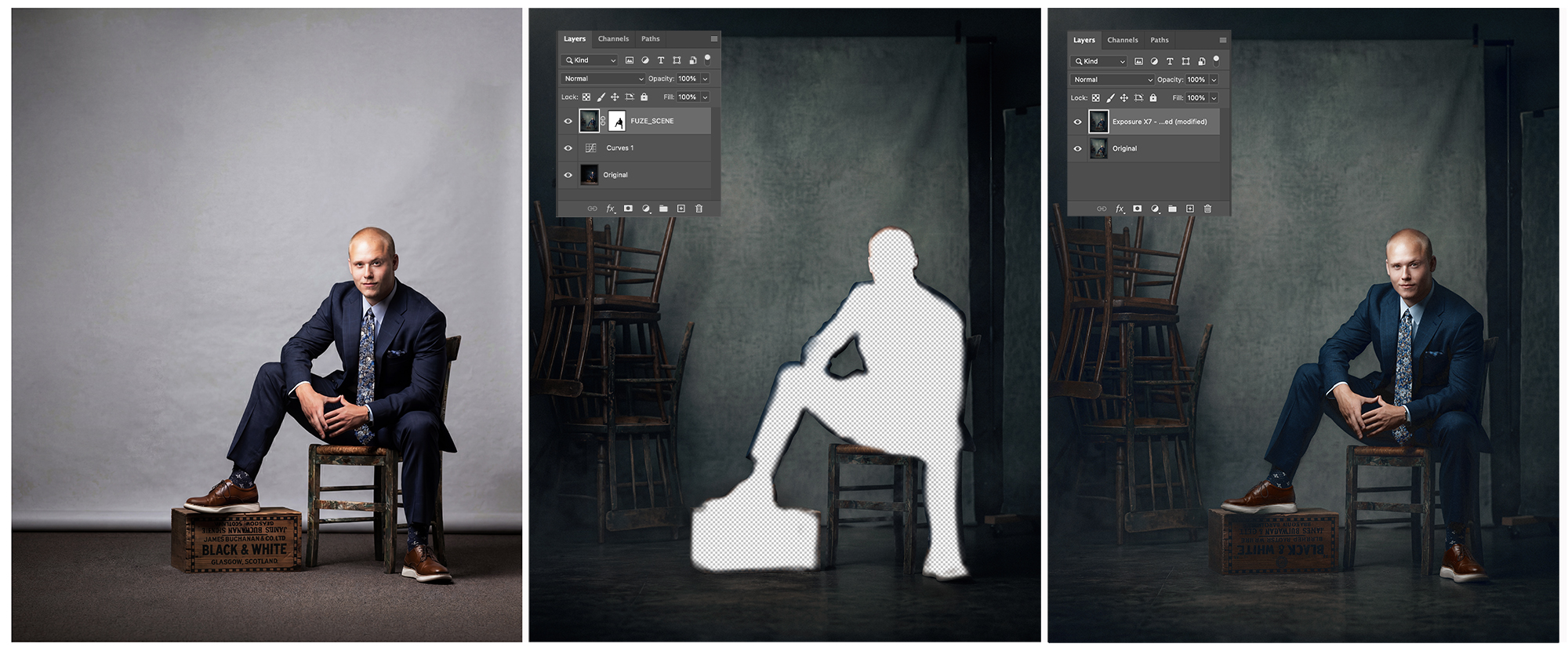
Start finished
Your photograph, fully retouched and edited — before you ever FUZE it. What goes in clean comes back clean.
Keep the FUZE scene and subject edges
Mask your subject back in — those edges are what FUZE does best. A Curves adjustment layer is included in your PSD file to color-balance your subject to the FUZE scene. Your subject stays 100% intact.
Polish it your way
An optional final pass — add filters, LUTs, or your own finishing recipe — for color and texture harmony.
Make it big. Bring your subject back.
Keep the world FUZE built. Then print it.