 BETA
BETA
Prep your photo.
Get the image you envisioned.
FUZE builds the world around your subject — the light, the scene, the atmosphere the day didn't give you. But it can only work with what you hand it. Start with a photo that's already great, and the results will follow.
Get the shot right in camera
Same subject, shot two ways — you’ll see it just below. These are the calls you can only make while the subject is still in front of you.
Sharp head to toe
Not just the eyes. FUZE rebuilds the edge of every limb, so a soft hand or a soft shoe reads as a bad composite rather than shallow depth of field. Stop down enough that the whole subject holds. FUZE can soften an edge later — it can’t invent detail that was never there.
Feet on the ground
Show the feet, and leave room beneath them. Crop too tight at the shoes and there’s nowhere for the feet to land on solid ground.
Leave room around your subject
Don’t crop tight to the body. FUZE needs space to build the world — to land a contact shadow under the shoes, to let the environment breathe around the shoulders and above the head. You can always pull in tighter later; you can’t add room that was never shot.
Believable perspective
Camera height and angle should fit the world you’re building. Low and dramatic, or eye-level and natural — decide before, not after.
Light that will match
Look at the direction your subject is lit. Then picture the scene you’re sending them into. Those two need to agree.
Keep the pose and wardrobe simple
Multiple contact points, busy patterns, transparent fabric, a hand wrapped through tennis-racket strings — every one of those is a place where things can go sideways. None are off-limits, but the simpler the starting image, the cleaner the result and the less cleanup on the back end. Simple pose, readable wardrobe, clean lines.
One fights FUZE. One frees it.
Same subject, same studio. One frame gives FUZE a clean, centered subject and room to build. The other fights it before the scene even starts.
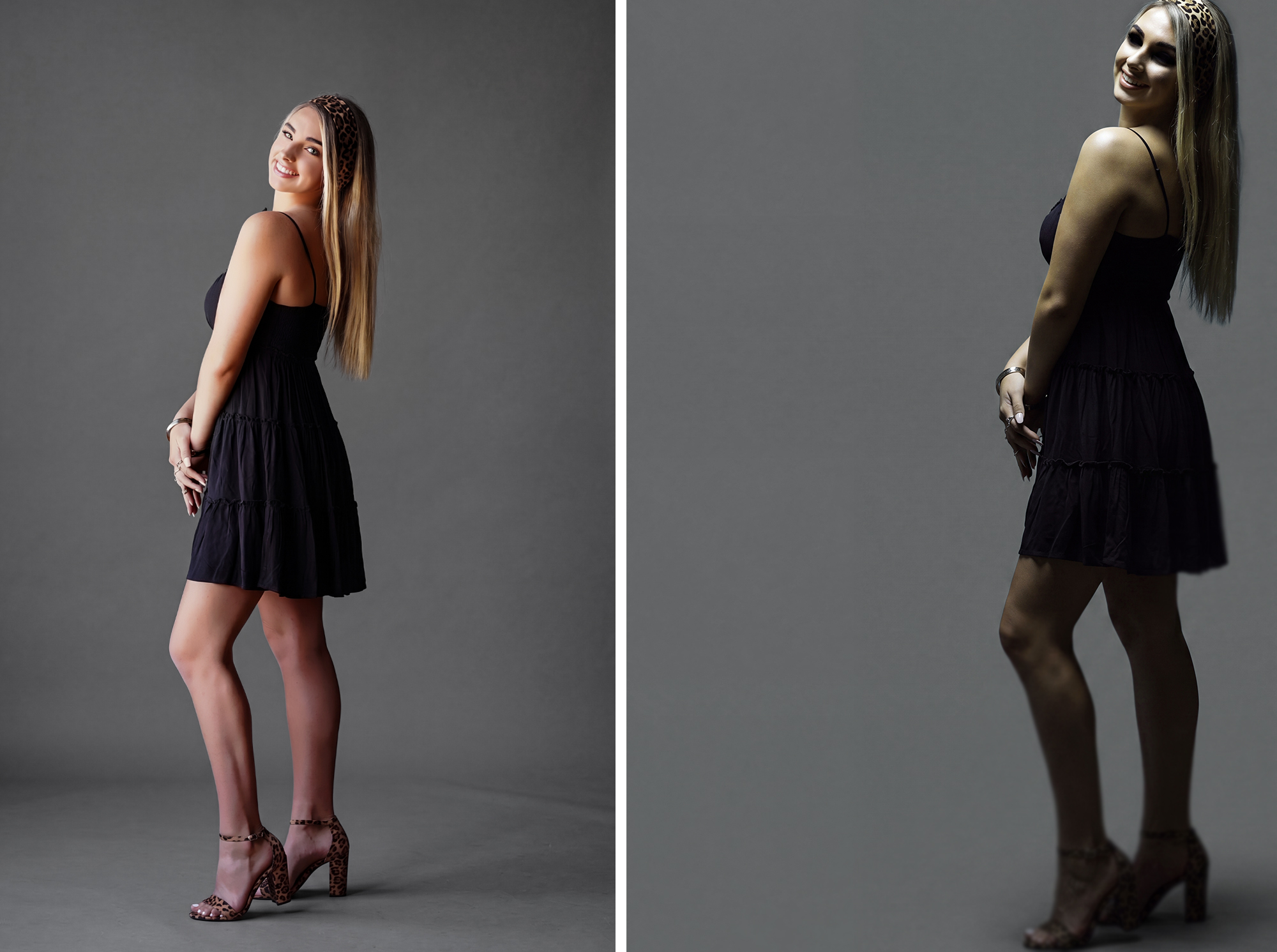
Everything FUZE wants. Centered, with room on every side — above her head, beneath her feet. Sharp head to toe, true color, clean separation from the sweep. FUZE is free to build her world.
Everything working against it. Cropped too tight, nowhere to build. Flat, muddy light and cold color. Feet soft and out of focus, subject shoved to one side. A frame like this fights FUZE before it starts.
Prep it before you upload
Then, at the keyboard, before FUZE ever sees it.
Edit it first
Do your normal portrait cleanup — and any body shaping — before FUZE ever sees it. Skin, stray hairs, lint, a wrinkled collar, any reshaping you’d normally do. FUZE preserves your subject exactly as delivered, every pixel. So whatever you hand it is what comes back. Handle it on the front end and you’re polishing a finished subject, not chasing problems through the scene.
Clean edges
Hair, shoulders, the line where your subject meets the background. Clean separation reads real — and a little edge or rim light always helps lift your subject off the scene. Gray or white backgrounds work best — swap a busy one before you FUZE.
Lock your ratio
Crop to one of these before you upload.
Either orientation works — flip any of these for landscape or portrait (3:2, 4:3, 5:4, 16:9).
FUZE doesn't replace you. It elevates you. You start with a solid image — your light, your craft, your eye, the moment — and FUZE completes your vision when the day didn't agree, or the location was off limits.
Quick fixes
Edit it first. Keep it sharp.
Leave room for the world. Then upload.